31 Temmuz 2014 Perşembe

RECYCLE BIN,FLASHBACK

After dropping tables,it is feared to lose datas but still recoverable.

Just like in operating systems,dropping tables means throwing recyclebin.
As it is displayed in picture,there you can see the tables dropped with its details.
Let's see something different.


I will somehow recover the datas from COPY_EMP table with its object name like here;


I have created a table named it turkey with two columns; city and plate_number respectively.I manipulated it with insert statement then dropped it.

The flashback is run on to recover table to its previous state. Good one !


Some Sql Queries 4 (MERGE)


  As seen above,it is possible to do more than one data manipulation language (insert,update,delete) statement with merge statement.

when starting with merge statement,manipulation is made on table written after merge statement.
It is easy. Useful. More than one columns are able to be changed or more datas are able to be added or some rows are able to be deleted.


Some Sql Queries 3 (ALTER,INSERT ALL)

---dropping column
alter table hamdi drop column birthdate;
---renaming table's name
alter table hamdi rename to hamdi2;
---renaming column's name
alter table hamdi2 rename column salary to income;


Here,we have insert all statement 


After 'into' statement we wrote some aliases inside 'values' parenthesis that was used in select statement.

In here aliases that were created work as if they are references filled in select sub-query.


Some Sql Queries 2 (INSERT,ALTER)


insert into (select location_id,city,country_id
            from locations )
values (3500,'New_York','US');


I can insert values as shown format above.Normally,this table has more columns than shown inside insert statement but i just wanted to insert specific columns. Rest of them are null at the row.


Here i altered table by adding a new column 'hamdi'. What a simple!


Some Sql Queries 1 (NOT EXISTS,WITH)


NOT EXISTS 

select department_name
from departments outer
where not exists (select '23523532'
from employees
where department_id=outer.department_id);


In here,this query is written regarding the HR Sample Schemas.

I just wanted to use 'not exists function' to understand how it works.

In here query shows the deparments names' which were not used in 'employees' tables.

'not exists' function finds the appropriate coloumn in 'employees' table itself whatever it is. In subquery there is number '23523532',it does not count anything. Here, anything can be written in here. As if the function itself finds whatever needed and sort out the expected result.


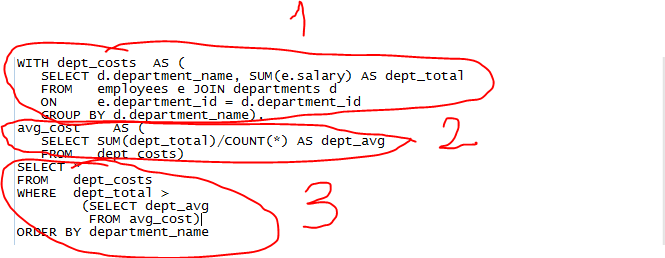
WITH ...


1-)
In this example, in memory we create a table which normally does not exist but in memory and we put its name dept_costs having two columns
department_name, dept_total (SUM(e.salary)) with a subquery joinging two different tables which exist in HR database(employees, departments)

2-)
At this part, we create another table with a column named 'dept_avg' in memory from previous table's columns which was also created in memory.

3-)
In this part we sort out a result with these two tables created in memory.


24 Temmuz 2014 Perşembe

REP-0110 Unable to open file '.....'

There might be more than one reason that causes this issues;

1-)Incorrect REPORT_PATH in registries
2-)Unsufficient privileges to acccess the files' path.

In my case,the user who had this problem could not access the file path due to some OS concerns.
The password user uses expired so needed to be changed to access specified path of file called by report.

23 Temmuz 2014 Çarşamba

HOW TO CHECK CURRENT USER'S PRIVILEGES

Perhaps,you want to create a user whom priveleges will be the same as someone's privileges but you do not know this someone's privileges on database.Here's an helpfull code which will show you the way.

set heading off
set pages 0
set long 9999999
select dbms_metadata.get_granted_ddl('ROLE_GRANT', user)
from dual;
select dbms_metadata.get_granted_ddl('SYSTEM_GRANT',user)
from dual;
select dbms_metadata.get_granted_ddl('OBJECT_GRANT', user)
from dual;


Just after writing the code above,press F5 button to see magic.